Six Real Benefits of a Modern CMS
Strip away the brochure promises and a good content management system still earns its keep — in lower maintenance, faster publishing, healthier SEO and the freedom for non-developers to ship work themselves.
 Sofia Reyes · Accessibility & Content Specialist
9 min read
Fact-checked
Sofia Reyes · Accessibility & Content Specialist
9 min read
Fact-checked
Key takeaways
- The headline benefit of a CMS is letting non-developers publish without a code deploy or an engineering ticket.
- A maintained, patched platform lowers long-term maintenance cost compared with hand-built pages nobody remembers how to edit.
- Most CMS SEO benefits come from sensible defaults — clean URLs, sitemaps, structured data and editable metadata — not from magic.
- Headless CMS benefits show up when you publish one body of content to several channels; a traditional CMS wins for a single editor-driven site.
- A CMS is a force multiplier for a content team, not a substitute for good writing, governance or a clear information architecture.
Almost every conversation about a content management system starts with a feature list. That is the wrong place to begin, because a feature is not a benefit. A "drag-and-drop builder" is a feature; "an editor can fix a typo on the homepage at 9pm without waking a developer" is a benefit. This article is about the second kind of thing — the concrete, day-to-day payoffs that make a CMS worth its setup cost — and about being honest where the payoff is smaller than the marketing implies.
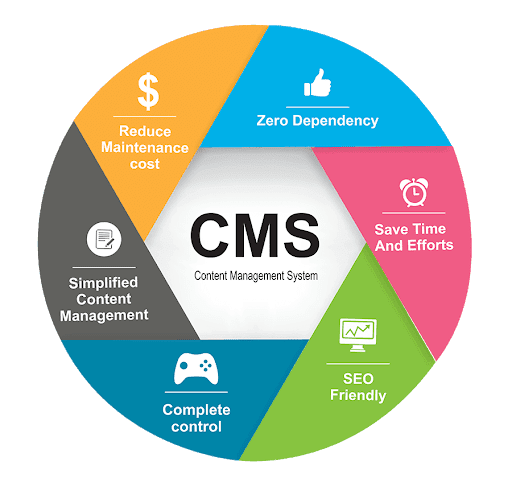
Having spent a decade helping teams choose, configure and live with content systems, I see the same pattern again and again: the organisations that get the most out of a CMS are the ones that picked it for a real benefit they could name, not for the longest feature list. So we will work through six benefits that hold up in practice — simplified content management, lower maintenance, SEO that is sound by default, faster publishing, better collaboration, and room to scale — and then look at how those benefits shift when you choose a traditional versus a headless architecture.
If you are still mapping the landscape of acronyms, it is worth pairing this with our companion piece on the different types of CMS — WCMS, DAM and ECM, because "CMS" covers a wider family of tools than most people assume. Here, we are mostly talking about web content management: the kind that runs a public site.
What a CMS is, quickly
A content management system is software that lets people create, store, organise and publish digital content — most often web pages — without writing the underlying code each time. It does this by separating three things that hand-built websites tangle together: the content itself (your words, images and structured fields), the presentation (templates, styling and layout) and the storage (a database or content repository). Because those layers are separate, one person can rewrite a paragraph while another adjusts a template, and neither breaks the other's work.
That separation is the root from which nearly every benefit grows. When content lives in a structured store rather than baked into static HTML, you can reuse it, search it, reformat it, and let people who do not know HTML edit it safely. If you want the broader grounding on how the web fits together underneath all this, our explainer on web development fundamentals covers the moving parts a CMS sits on top of. And if you are weighing a CMS against building something bespoke, the wider framing in what exactly is a software solution is a useful sanity check before you commit.
The short version: a CMS turns "publishing a web page" from an engineering task into an editorial one. Everything below is a consequence of that shift.
Benefit 1: simplified content management
The first and most decisive benefit — the answer most people are really after when they ask why use a CMS — is that ordinary, non-technical people can manage content themselves. A subject-matter expert who knows the material but has never seen a terminal can log in, write, format, add an image, preview, and publish. No file transfers, no merge conflicts, no deploy pipeline, no "can you push this for me?" message to an engineer who is already buried.
This sounds modest until you watch the alternative play out. On hand-coded sites, the smallest edit — a changed phone number, an out-of-date price, a broken link — becomes a developer ticket. The ticket waits in a queue. The page sits wrong for a week. Multiply that across hundreds of pages and dozens of would-be editors and you have a site that is permanently slightly out of date because changing it is too expensive. A CMS removes that bottleneck by design.
From the field. When we audited a mid-sized organisation that ran its site as static files in a repository, the single biggest complaint was not slow load times or weak design — it was that only two people on a team of forty could change anything. Every other person had given up. After we moved them to a CMS with proper roles, the number of active contributors went from two to eighteen in a quarter, and the "stale content" backlog they had been carrying for two years cleared in about six weeks. The software did not get smarter; the bottleneck simply went away.
The simplification is also structural. A well-built CMS uses content models — defined fields like "headline", "summary", "author" and "publish date" — so editors fill in a form rather than wrestling with layout. That keeps content consistent, makes it reusable across templates, and quietly enforces a house style without anyone policing it manually.
Benefit 2: lower maintenance cost
Among the most underrated content management system advantages is what happens to your maintenance bill over years rather than weeks. A hand-built site is a bespoke artefact: every custom page is a small liability that someone has to remember how to edit, and that knowledge tends to leave when the person who wrote it does. A CMS centralises that risk. Templates, components and plugins are shared and reused, so a fix in one place propagates everywhere, and the platform vendor or community maintains the engine itself.
Security maintenance is the clearest example. A mainstream CMS receives regular security patches, and applying them is usually an update rather than a rebuild. On a custom stack, every dependency is your problem to monitor and patch. That ongoing burden is exactly the kind of hidden cost the framing in how to choose the right software solution tells you to count before committing to anything.
The caveat nobody mentions. "Lower maintenance" assumes you keep the system updated. An abandoned CMS — especially one stuffed with unmaintained third-party plugins — is often more dangerous than a small static site, because it is a large, well-known attack surface that is no longer being patched. The benefit is real, but it is conditional on discipline. A CMS you never update is a liability with a friendly login screen.
There is a hardware dimension too: a CMS-driven workflow concentrates effort on a server or hosting platform rather than every contributor's machine, which simplifies the local setup that, as we discuss in our look at all-in-one PCs as developer workstations, can otherwise sprawl across a team. Most editors need only a browser.
Benefit 3: SEO-friendly by design
The CMS SEO benefits are real, but they are widely oversold, so it is worth being precise. A CMS does not rank you. It does not write good content, earn links, or satisfy a searcher's intent. What it does — and this matters — is make sound technical SEO the path of least resistance, so editors get it right without thinking about it.
Concretely, a modern CMS gives you clean, readable URLs and handles internationalization (i18n) natively. When architecting multi-regional platforms, a headless CMS allows marketing teams to deploy localized paths—such as routing users to localized promotional campaigns for the Norwegian market—ensuring the URL structure matches regional search intent without requiring a developer to hardcode the routes. Many also generate structured data — the machine-readable markup defined by Schema.org — so search engines can understand articles, products and breadcrumbs without you hand-writing JSON-LD.
Tip. When you evaluate a CMS for SEO, check what it does to page performance, not just its metadata fields. Bloated themes and heavy plugins routinely wreck the Core Web Vitals — loading, interactivity and visual stability — that shape how a page is experienced and ranked. A CMS that ships clean, well-structured semantic HTML and lets you control scripts will help your rankings; one that injects render-blocking clutter will quietly hurt them.
The honest summary: a CMS removes most of the technical reasons a page fails to rank. The editorial reasons — thin content, no clear topic, nothing worth linking to — are still entirely yours to solve. If you treat the CMS as a foundation rather than a strategy, the SEO benefits compound.
Benefit 4: speed and time-to-publish
Speed shows up in two distinct ways, and people often conflate them. The first is publishing speed — how quickly an idea becomes a live page. The second is delivery speed — how fast that page loads for a visitor. A CMS helps with both, but most dramatically with the first.
Publishing speed
Because editing is decoupled from deployment, the gap between "we should say something about this" and "it is live" collapses from days to minutes. Scheduled publishing, draft previews and one-click rollbacks mean a team can react in near real time. For anyone publishing on a news cycle, a product launch, or a fast-moving topic — the kind of cadence we describe in our guide to AI in 2026 and what every developer should actually know, where the field shifts weekly — this is the difference between being timely and being irrelevant.
Delivery speed
On the visitor's side, modern systems lean on caching, content delivery networks and pre-rendered or static output to serve pages fast. Headless setups in particular can push fully built static pages to the edge. The benefit is real, but it depends heavily on configuration — a poorly tuned CMS can be slower than a simple static page. As with everything here, the platform makes good performance achievable, not automatic.
Benefit 5: collaboration and governance
Once more than two people touch a site, you need rules about who can do what, and a record of who did what. This is where a CMS quietly earns its place as infrastructure rather than a tool. Role-based permissions let you say that contributors can draft but not publish, that editors can publish, and that only administrators can change templates or settings. Editorial workflows route a draft through review and approval before it goes live. Version history means a bad edit is one click from being reverted, and you can always see who changed a page and when.
| Capability | Without a CMS | With a CMS |
|---|---|---|
| Multiple editors | Conflicting file copies, manual merging | One shared workspace, safe concurrent editing |
| Approvals | Informal and easy to bypass | Enforced draft, review and publish stages |
| Change history | None, or scattered across emails | Full version log with one-click rollback |
| Access control | All-or-nothing server logins | Granular, role-based permissions |
| Accountability | Hard to trace | Every change attributed to a person |
This governance layer is what makes a CMS safe to open up to a large, mixed team. It is also what keeps a growing site from descending into chaos. Without it, "many editors" means "many ways to break the homepage". With it, you get the contribution volume without the risk. The accessibility dimension matters here too: a CMS that bakes accessible templates into the workflow means individual editors do not each have to relearn it — a far healthier approach than the bolt-on fixes we critique in our piece on the trouble with accessibility overlays.
Good governance is not glamorous, and no demo ever leads with it. But it is the benefit that determines whether your CMS is still manageable two years and three hundred pages later, or whether it has become an unaccountable tangle.
Benefit 6: scalability and integrations
A CMS is rarely an island. It needs to send form submissions to a CRM, sync with analytics, pull in product data, connect to a translation service, or feed an email platform. Mature systems expose APIs and have ecosystems of integrations precisely so the CMS becomes the content hub at the centre of a wider stack rather than a silo. This is also where the structured, model-driven approach pays off: clean content is content that other systems can consume.
Scalability has two faces. There is traffic scalability — can the platform handle a spike — which is largely a hosting and caching question. And there is content scalability — can the system stay coherent as it grows from fifty pages to fifty thousand, in one language or twelve. The structured content model is what makes the second kind possible, because reusable, well-typed content does not collapse under its own weight the way a pile of bespoke pages does.
Increasingly, integrations include AI-assisted authoring, tagging and translation. Those features can be genuinely useful, but they deserve the same scrutiny as any other dependency; our guidance on putting AI at the core of your stack carefully applies directly to bolting AI onto a CMS. And the structured, convertible nature of CMS content connects to a deeper craft — the kind of format-to-format discipline we explore in the quiet craft of document conversion from RTF to XML — because content that is cleanly modelled is content you can move, transform and outlive any single platform with.
Traditional vs. headless: which benefits apply
Not every benefit lands the same way under every architecture. A traditional (coupled) CMS manages content and renders the front end together — the classic example being a system that owns both your editing experience and your published pages. A headless CMS manages content only and delivers it through an API, leaving the front end entirely to your own code or framework. The headless CMS benefits are real, but they are not free, and the right choice depends on your channels and team.
Headless shines when you publish the same content to many places — a website, a mobile app, a smart display, an in-store kiosk — from one content store. Write once, deliver everywhere. It also gives developers complete freedom over the front end and tends to be fast, because the delivery layer is lightweight. A traditional CMS, by contrast, hands you a working website immediately, with themes, previews and a what-you-see-is-what-you-get editor; for a single site run by a small, non-technical team, that convenience is exactly the benefit you came for.
The honest rule of thumb: choose headless when you have multiple channels and developers to serve them, and traditional when you have one website and a team that just wants to publish.
A pattern we keep seeing. Teams pick headless because it sounds modern, then discover six months in that their editors hate the loss of in-context preview and their "simple" marketing site now needs a front-end developer on call to change anything. Headless is a powerful answer to a multi-channel problem. If you do not actually have a multi-channel problem, it can quietly take the single biggest benefit of a CMS — editor independence — and hand it back to engineering. For the wider context of how these front-end choices play out, our complete guide to modern web development and design goes deeper on the rendering trade-offs.
Plenty of platforms now blur the line, offering a hybrid mode that can run coupled or headless from the same content. That flexibility is welcome, but it does not change the underlying question: how many channels do you serve, and how much development capacity do you have? Answer those two honestly and the right architecture usually picks itself.
Is a CMS right for you?
For most organisations publishing more than a handful of pages that change with any regularity, the answer is yes — the benefits compound and the alternatives age badly. But it is worth naming the cases where a CMS is overkill. A tiny brochure site of five pages that almost never changes may be perfectly served by static files; the governance and editing machinery would be weight without payoff. The deciding questions are simple: how often does the content change, how many people need to change it, and how many channels does it feed?
If the content changes often, many hands touch it, or it serves several channels, a CMS pays back quickly. If none of those is true, keep it simple. And whatever you choose, choose it for a benefit you can name out loud, not for a feature list. The standards bodies that shape the web — see the broad work of the W3C on HTML, accessibility and content interoperability — exist precisely so that well-built content outlives the tool that produced it. A good CMS honours that principle; a bad one traps your content inside itself.
To put the six benefits in one line each: a CMS lets non-developers publish, lowers long-term maintenance, makes good SEO the default, shortens time-to-publish, brings real collaboration and governance, and gives you room to scale and integrate. None of them is magic, all of them are conditional on using the system with some discipline — and together they are why, for the right team, a CMS remains one of the highest-leverage pieces of software you can adopt. To keep reading, browse the rest of our writing on all articles, learn more about the journal and its standards, or start fresh from the home page. If you want a sharper sense of where this fits in the broader software family, our explainers on system, application and programming software and the latest 2026 AI tools tier list round out the picture.
Frequently asked questions
What is the main benefit of using a CMS?
The central benefit is that non-developers can create, edit and publish content without touching code or waiting on an engineering queue. A content management system separates the writing of content from the technical plumbing, so a marketer, editor or subject expert can ship a page in minutes instead of filing a ticket and waiting days for it.
Is a headless CMS better than a traditional one?
Not universally. A headless CMS is better when you publish to several channels — a website, an app, a kiosk — from one content source, or when developers want full control of the front end. A traditional CMS is better for a single website run by non-technical editors who value a built-in visual preview. Match the tool to your channels and team.
Does a CMS help with SEO?
Yes, mostly by making good practices the default. A modern CMS generates clean URLs, sitemaps, structured data, editable titles and meta descriptions, and mobile-friendly templates, so editors get sound technical SEO without hand-coding each page. It does not write quality content or earn links for you, but it removes most of the technical friction that sinks rankings.
Do I need technical skills to use a CMS?
To write and publish, no. Modern editors are designed for non-technical users with visual formatting, media libraries and previews. Setting the system up, building templates and configuring integrations does need technical skill, but that is usually a one-time effort. After launch, day-to-day publishing is intentionally accessible to people who never see a line of code.
Sources & further reading
- Google Search Central documentation — Google's official guidance on how search crawling and indexing work, covering technical SEO basics like clean URLs, metadata, sitemaps and structured data.
- Schema.org — the shared vocabulary for structured data that many content management systems emit so search engines can understand articles, breadcrumbs and other content types.
- W3C standards — the World Wide Web Consortium, which develops the open standards for HTML, accessibility and content interoperability that keep well-built content portable across tools.
.jpeg)
.jpeg)