System, Application & Programming Software, Explained
Every computer runs on layers of software with different jobs. Here is how system, application, programming and utility software fit together — explained plainly, with examples you already use.
 David Mercer · Principal Software & Web Engineer
7 min read
Fact-checked
David Mercer · Principal Software & Web Engineer
7 min read
Fact-checked
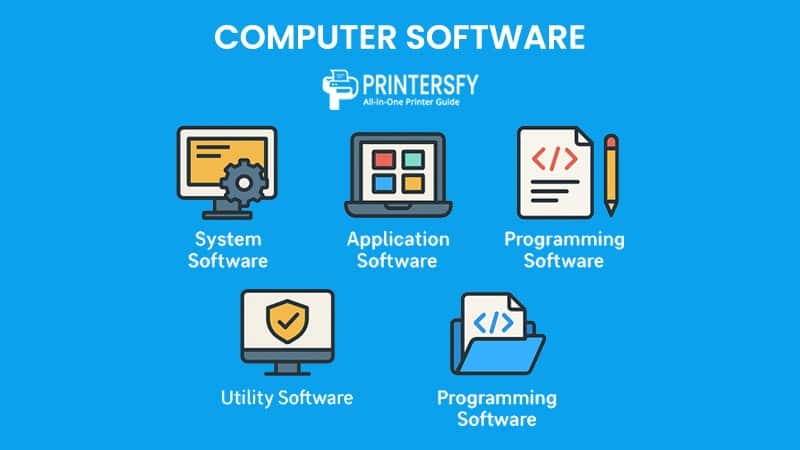
Key takeaways
- The types of computer software fall into three core families — system, application and programming software.
- The system software vs application software distinction comes down to who is served: the machine, or you.
- Knowing what is programming software explains how every other program gets built in the first place.
- Common utility software examples include antivirus tools, disk cleaners, backup managers and file compressors.
- Firmware and middleware sit between the headline categories, and the open-source-versus-proprietary question cuts across all of them.
If you have ever wondered why your laptop needs an operating system, why a web browser and a word processor feel like cousins, or what developers actually mean when they say "tooling," you are really asking about the different types of computer software. Software is not one monolithic thing. It is a stack of layers, each with a clearly defined job, each leaning on the layer beneath it. Understanding those layers makes nearly every technology conversation easier — from buying a machine to choosing a platform to talking sensibly with the engineers who build the things you rely on every day.
In this guide I want to hand you a practical map rather than a textbook taxonomy. We will start with the single most important split — system software versus application software — and then add the other categories that matter in real life: programming software, utility software, firmware and middleware. Along the way I will point out where the neat boundaries blur, because in production they always do. By the end you should be able to look at any program on your screen and place it confidently in the right bucket, and to explain that placement to someone else.
This is foundational material, so it pairs well with our broader explainer on what exactly a software solution is and with our primer on web development fundamentals, clearly explained. If you are here to settle an argument or revise for a course, the reference table near the end summarizes everything at a glance.
The big picture: system vs. application software
Imagine a computer as a building. The foundation, plumbing and electrical wiring are hidden, unglamorous and absolutely essential — without them nothing else works. The offices, kitchens and shops on the floors above are what people actually visit and use. In software terms, the foundation is system software and the rooms are application software. That single image carries you most of the way to understanding the whole field.
The cleanest way to state the system software vs application software distinction is this: system software serves the computer, while application software serves the person. The operating system, drivers and low-level services exist to manage hardware, schedule work and present a usable platform. Applications exist to accomplish a goal a human cares about — writing, drawing, messaging, calculating. When you double-click an icon to do something, that is almost always an application. The thing that made the icon clickable in the first place is system software.
This layered model is more than a teaching convenience. It reflects how computers are genuinely engineered, and it is recognized in formal software-quality frameworks. The widely cited ISO/IEC 25010 software quality model describes characteristics — reliability, maintainability, portability and more — that apply across these layers but are weighted very differently for each. A driver and a photo editor are judged by different standards even though both are "software," and the layered model is what lets us reason about that difference rather than lumping everything together.
Quick test: ask yourself, "Could a non-technical person open this on purpose to get something done?" If yes, it is almost certainly application software. If it runs silently in the background to keep the machine alive, it is system software. The grey cases — installers, browsers, some utilities — are exactly the ones worth thinking about carefully, and we will return to them.
System software: the operating system and drivers
System software is the layer that brings raw hardware to life and keeps it cooperative. The crown jewel of this category is the operating system: Windows, macOS, Linux, Android and iOS are the names most people recognize. The operating system manages memory, schedules which programs get the processor and when, organizes files on disk, enforces security boundaries between programs, and exposes a consistent interface so that applications never have to know the intimate details of your specific hardware.
Beneath and around the operating system sit several other kinds of system software. Device drivers are small, specialized programs that teach the operating system how to talk to a particular piece of hardware — your graphics card, printer, webcam or Wi-Fi adapter. Without the right driver, a perfectly good device is just an expensive paperweight. The BIOS or UEFI firmware that runs the instant you press the power button is system software too, although it blurs into the firmware category we discuss later. System services and daemons — background processes that handle networking, printing, time synchronization and updates — round out the layer.
Why the operating system matters so much
The operating system is the great mediator. When a word processor wants to save a file, it does not write magnetic or flash patterns to a disk itself; it politely asks the operating system, which handles the messy reality of the storage hardware. This indirection is what lets the same application run on machines with wildly different internals. It is also why the choice of operating system shapes so much of the rest of your experience, a theme we return to when discussing all-in-one PCs as developer workstations. The platform you stand on determines which applications you can run and how well they perform.
A pattern we keep seeing in support tickets: a piece of hardware "stops working" right after a major operating-system update. Nine times out of ten the device itself is fine — the driver, a slice of system software, simply fell out of step with the new OS. When we walk people through reinstalling or updating the driver, the hardware springs back to life. It is a small but vivid reminder that system software is not abstract plumbing; it is the precise reason your gadgets do, or do not, behave.
Application software: getting work done
Application software is the part of the stack you spend your day inside. It is purpose-built to perform a specific task — or family of tasks — for a human user. Word processors, spreadsheets, web browsers, email clients, photo editors, games, accounting packages, video-conferencing tools and the apps on your phone are all application software. If system software is the stage, applications are the actors who actually put on the show.
It helps to recognize a few sub-types. General-purpose applications serve broad needs — a spreadsheet can model a budget, a research dataset or a wedding guest list. Special-purpose or bespoke applications are built for one narrow job, such as the software running a hospital's imaging machine or a factory's assembly line. Web applications blur the line further: the program runs on a server, and your browser is merely the window onto it. Anyone building these today leans on the standards documented at MDN Web Docs, the reference engineers reach for when they need authoritative detail on HTML, CSS and JavaScript.
Is a browser an application?
This question trips people up often enough that it deserves a direct answer: a web browser is application software. You open it deliberately to accomplish a goal — reading pages, filling forms, watching video — which places it squarely in the application layer. Yes, it leans heavily on the operating system and network drivers underneath, and modern browsers are so capable that they behave almost like a small operating system of their own. But the browser is not part of keeping the machine alive, and that is the line that matters. If you want to go deeper on the technologies a browser renders, our complete guide to modern web development and design covers the front-end stack in detail.
Programming software: building the tools
Here is the category that explains where all the other software comes from. Programming software is the toolset developers use to create new programs. It does not perform a typical end-user task itself; its job is to translate human intentions, written as source code, into instructions a computer can execute. Answering what is programming software is really answering the question, "How does software get made in the first place?"
The core members of this family include code editors and integrated development environments (IDEs), where developers write and organize code; compilers, which translate an entire program from a human-readable language into machine code ahead of time; interpreters, which translate and run code line by line; assemblers, which convert low-level assembly into machine instructions; debuggers, which let developers pause a running program and inspect its insides; linkers and build tools, which stitch separate pieces into a finished program; and version-control systems such as Git, which track every change to a codebase over time.
An IDE is worth singling out because it bundles many of these tools into one window — editor, compiler or interpreter hooks, debugger and version-control integration, all at once. The richness of modern tooling is a big part of why software moves so fast today, and it is increasingly shaped by AI assistants that live inside the editor. We explore that shift in our guide to AI in 2026: what every developer should actually know and rank the current crop of assistants in our 2026 AI tools tier list, honestly ranked.
Common confusion: people sometimes lump programming software in with system software because both feel "technical" and live below the friendly application surface. Resist that. A compiler does not run your machine; it builds programs. The distinguishing question is purpose. System software operates the computer, application software serves the user, and programming software produces software. Three different jobs, three different categories.
Utility software
Utility software is the practical, often invisible helper category. These are small, focused programs that maintain, optimize, protect or analyze a computer system. They sit close to the system-software layer — some textbooks even fold them into it — but they are specialized enough to deserve their own name. The clearest utility software examples are tools you have probably touched without thinking of them as a category at all.
- Antivirus and anti-malware scanners that watch for and remove malicious code.
- Disk cleanup and defragmentation tools that reclaim space and tidy storage.
- Backup and recovery managers that copy your data somewhere safe and restore it when things go wrong.
- File compression utilities, such as the ones that create and open ZIP archives.
- System monitors and task managers that show what is consuming memory, processor time or network bandwidth.
- Firewalls and encryption tools that guard the boundary between your machine and the wider network.
The reason utilities feel different from ordinary applications is that their "user" is partly the system itself. You run a disk cleaner not to produce a document but to keep the computer healthy. That maintenance role is why they cluster near system software in the mental map, even though you launch many of them deliberately, the way you would an application. The boundary, as with so much here, is genuinely fuzzy — and that is fine. The categories are a vocabulary, not a courtroom.
Where firmware and middleware fit
Two categories deserve a closer look because they do not slot neatly into the headline three. Firmware is software permanently or semi-permanently stored on a hardware device, controlling that device at the lowest level. The code in your router, the controller inside a solid-state drive, the program running your microwave or your wireless earbuds — all firmware. The BIOS or UEFI on your motherboard is firmware too. It is software by definition, but it is so tightly bound to specific hardware that it occupies a niche of its own, somewhere just below the operating system.
Firmware is also where the line between "hardware" and "software" gets philosophically blurry, which is one reason the standards bodies that govern this space take it seriously. The IEEE — the professional organization behind much of the world's foundational computing and electronics standardization — publishes standards and vocabularies that help engineers agree on exactly what these terms mean, which matters enormously when teams across companies and countries have to build interoperable systems together.
Middleware: the connective tissue
Middleware sits between the operating system and the applications, or between two applications that need to cooperate. It is software whose whole purpose is to let other software talk to each other. Database connectors, message queues, web servers, authentication services and API gateways are common examples. You rarely interact with middleware directly, but modern distributed systems would collapse without it. When we discuss putting AI at the core of your stack carefully, much of the real work happens in this middleware layer — wiring models into the systems that already exist. Document-processing pipelines, like the ones in our look at the quiet craft of document conversion from RTF to XML, also live largely in this connective tier.
Open-source vs. proprietary software
One more distinction cuts across every category above, and it has nothing to do with what the software does and everything to do with how it is licensed and shared. Proprietary software is owned by a person or company that keeps the source code private and controls how the software may be used, copied and modified. Open-source software publishes its source code under a license that lets anyone read, modify and redistribute it, subject to the license's terms.
This split appears at every layer. There are open-source operating systems (Linux) and proprietary ones (Windows, macOS). There are open-source applications (the LibreOffice suite, the Firefox browser) and proprietary ones (Microsoft Office, Photoshop). The same is true of programming tools, utilities and middleware. Neither model is automatically better; each carries trade-offs around cost, control, support, transparency and security. The choice usually comes down to context, which is exactly the kind of decision we walk through in how to choose the right software solution. The same context-first thinking applies when you weigh content platforms, a topic we unpack in decoding the CMS alphabet of WCMS, DAM and ECM.
Open-source software is especially significant because so much of the modern internet quietly runs on it. The web servers, programming languages, databases and frameworks that power countless sites are open source, maintained by global communities. Accessibility tooling and standards work benefit from this openness too — though, as our piece on the trouble with accessibility overlays argues, openness is not a substitute for doing the underlying work properly. Transparency lets anyone inspect software, but someone still has to read the code and actually care about the result.
A quick reference table
To pull everything together, here is a side-by-side summary of the main types of computer software, each with its core job, who it serves and a couple of familiar examples. Use it as a cheat sheet whenever the categories blur — which, as we have seen, they regularly do at the edges.
| Software type | Primary job | Who it serves | Familiar examples |
|---|---|---|---|
| System software | Run and manage the computer's hardware and resources | The machine | Windows, macOS, Linux, device drivers |
| Application software | Perform a specific task for a person | The user | Browsers, word processors, email, games |
| Programming software | Create and build other software | The developer | Compilers, IDEs, debuggers, Git |
| Utility software | Maintain, protect and optimize the system | System & user | Antivirus, backup tools, disk cleaners |
| Firmware | Control a specific hardware device at a low level | The device | BIOS/UEFI, router and SSD firmware |
| Middleware | Connect software components so they cooperate | Other software | Web servers, message queues, API gateways |
The categories in this table are not rigid walls; they are a shared vocabulary. The value of learning them is not in policing whether a given utility is "really" system software, but in being able to reason about how a computer is put together. Once you can see the layers — hardware at the bottom, firmware and the operating system above it, middleware and applications stacked higher, with programming tools off to the side producing all of it — the whole machine stops feeling like magic and starts looking like architecture you can inspect.
That mental model pays off far beyond trivia. It helps you diagnose problems, evaluate products, talk to engineers and make better technology decisions. If you want to keep building from here, browse our full library of articles, learn more about the people and standards behind this journal on the about page, or head back to the home page to see what is new. Software is layered all the way down, and every layer is worth understanding.
Frequently asked questions
What are the main types of computer software?
Computer software is usually grouped into three broad families. System software runs the machine and includes the operating system and drivers. Application software helps you get work done, such as browsers and editors. Programming software lets developers build new tools. Utility software, firmware and middleware are useful sub-categories that sit alongside these three families.
What is the difference between system and application software?
System software manages the hardware and provides a foundation for everything else; the operating system and device drivers are the clearest examples. Application software runs on top of that foundation to perform a task a person cares about, such as writing a document or browsing the web. Put simply, system software serves the computer while application software serves you.
Is a web browser system or application software?
A web browser is application software. It is a program you open deliberately to accomplish a goal, namely viewing web pages, which places it in the application layer. It does rely heavily on system software underneath, including the operating system and network drivers, but the browser itself is not part of running the machine, so it stays firmly in the application category.
What counts as programming software?
Programming software is the toolset developers use to create other software. It includes code editors, compilers, interpreters, assemblers, debuggers, linkers and version-control systems. An integrated development environment bundles many of these into one window. These tools do not perform a typical end-user task themselves; instead they translate human-written code into programs the computer can run.
Sources & further reading
- IEEE — the professional body behind much of the world's computing and electronics standardization, including the vocabularies and standards that formalize how software terms are defined.
- ISO/IEC 25010 — the international software product quality model, describing characteristics such as reliability, maintainability and portability that apply across software categories.
- MDN Web Docs — the authoritative open reference for web technologies, widely used by engineers building application and web software.
.jpeg)